Most coding agents rely on sub-agents to manage complex workflows. Pi's session branching offers a different way to handle multiple lines of work in a single session, with deliberate control over context and state. This short post explains my main insight into Pi's session management.
When I started using Pi, I initially glanced over Pi's session management feature. I used session management in Claude Code and OpenCode before to undo and redo work in a session, but in quite a few cases session branching can be used as an alternative to sub-agent orchestration.
To start, view the session tree in Pi: run /tree, or press Esc twice, and see all session messages. You can jump back to any of them, even the tool calls. Here is what a session looks like (from pi.dev).
At first, I used the tree, as I did in OpenCode, mainly to go back up in my history, which is useful in itself, but I always got this question, which initially confused me:
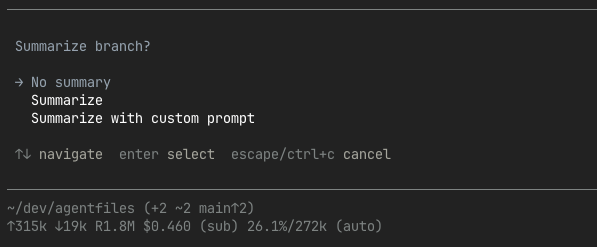
Why would it ask me to summarise? Then I realised that Pi's tree isn't just for history, it's also for branching. Not just up and down the tree, but to every message and branch in the session, with the option to carry a summary with it of what happened on each branch. It's not sub-agents, but in the same session you can experiment, create review branches, fix bugs, or return to pre-compaction states. And this is only scratching the surface of what is possible.
For example, one use case for sub-agents is scouting the codebase without keeping file contents in the LLM's context. Sub-agents run outside the main context and summarise their findings back to the main session. With Pi's session branching, you achieve the same result: return to the point before scouting began, ask for a summary, and continue from there. (And if you need to scout further, you can always return to the scouting branch later in the same session.)
Importantly, when you navigate back in the session, you return to the context window as it existed at that point. So there are efficiency and cost savings here as well.
Unlike OpenCode and Claude Code, Pi doesn't restore the filesystem to earlier states. Any artefacts you create on one branch remain available to others. This works because you can continue building on artefacts in other branches, all for that session's purpose. I think this way of working is a result of Pi's core philosophy to simplify and provide ways of working without having to resort to sub-agents or having to start a new session often.
A short example
As stated, you can reuse the same session for planning, implementation, and review while keeping the context clean. As a simple example, I'll show how to plan and implement in the same session while keeping the context clean. You can do this without the need for sub-agents or a session restart.
Creating a plan in a markdown file typically requires several iterations before it's ready for implementation. Once you have a plan, you save it, say, as plan.md. To view the session tree, run /tree or press Esc twice. This is where you navigate between branches.
With the plan in hand and saved on disk, I often select the message that kicked off the planning. Pi will then ask if you want to navigate back without summary, with summary, or with summary using a custom prompt. Either option works. For the 'no summary' scenario, you will have to instruct Pi where the plan is and go from there. This is the case where you simply start with the original context again and you ask it to implement or review the plan.
Or you can choose to summarise if you want to give additional context. This is what I usually do. A summary after planning, for example, then looks like:
[branch]

 Branch Summary

 The user explored a different conversation branch before returning here.
 Summary of that exploration:

 Goal

 Plan how to integrate the current static Vite app into https://...

 Constraints & Preferences

 ...

 Progress

 ### Done

 ...
 - Left plan mode and wrote the plan file:
     - docs/plans/feature-xyz.md

 ### In Progress

 - No implementation has been started yet.

 ### Blocked

 ...

 Key Decisions

 ...

 Next Steps

...
 <read-files>
 spec.md
 src/pwa.ts
 vite.config.ts
 ...
 </read-files>
 <modified-files>
 docs/plans/feature-xyz.md
 </modified-files>


 Navigated to selected point
Note how this explains that it's summarising work from a different conversation branch: the goal that was being planned, the location of the plan, decisions made, and relevant files.
After this, you are working with the context up to the point where you branched off with the summary added, and in the session tree you will see a new branch. You can label branches too. In this example, I would label the main planning branch with planning before navigating. At any point, I can go back to any message in the session tree. If I want to iterate on the planning based on new insights, I can go back to the planning branch.
To be honest, the session tree can become overwhelming, but luckily it is searchable too.
In contrast, sub-agents are usually used as one-off workers that return their results to other agents. After that, the sub-agent is considered to have completed its work. Returning to iterate is typically not an option.
So you can stick to a single self-contained session for all related work, which can be resumed at any time.
Conclusion
I hope this post gave you some insight into Pi's session management. Session branching is not a replacement for sub-agents, but it offers a more manual, transparent, and deliberate way to structure agent work.
Pi does not have built-in sub-agent support, and I think this is part of the reason why. Sub-agents are useful, but not the only option. When using other coding agents, I will be looking at session management more closely too, searching for similar functionality.
In short, with Pi, you can use session branching instead of ever more sub-agent orchestration.