Often, large language models (LLMs) are evaluated in certain categories, for example, coding, writing, or tool-calling. I wasn't sure what tool-calling meant, so I decided to do some AI-assisted research. I used LeChat and GPT-5.4, going back and forth between them, checking references, to get a better understanding.
My main desired outcome was an infographic that is usable, and I think it does a good high-level job of explaining what tool-calling is and when you should use it. That is why I decided to share it here as well.
To find LLMs to use for this category you could check LLM Stats.
To be clear and explicit: the below is generated by an LLM but driven and reviewed by me. I also added a text version that is an almost exact copy after the graph.
LLM Tool-Calling
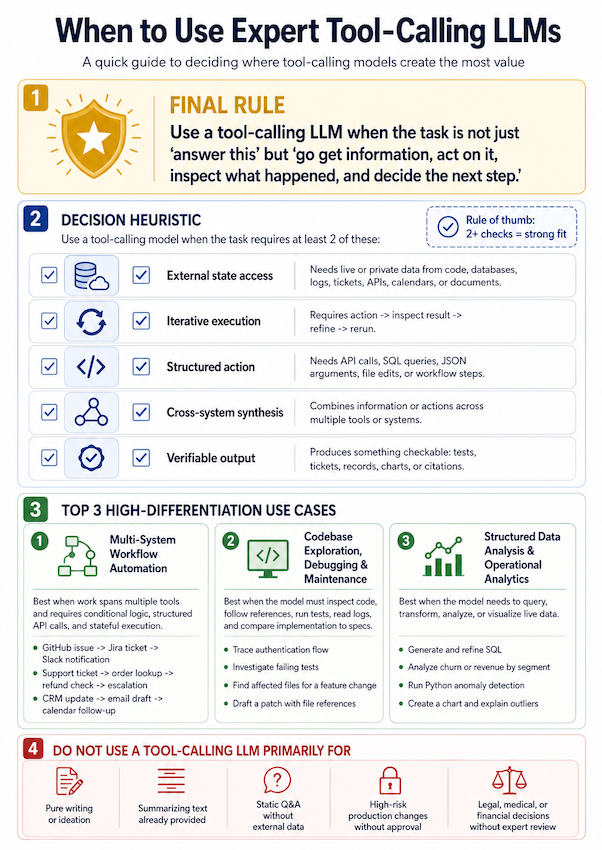
Here is the same content in text:
When to Use Expert Tool-Calling LLMs
A quick guide to deciding where tool-calling models create the most value.
1. Final Rule
Use a tool-calling LLM when the task is not just “answer this” but “go get information, act on it, inspect what happened, and decide the next step.”
2. Decision Heuristic
Use a tool-calling model when the task requires at least 2 of the following:
Rule of thumb:
2+ checks = strong fit
| Check | Heuristic | What it means |
|---|---|---|
| ✅ | External state access | Needs live or private data from code, databases, logs, tickets, APIs, calendars, or documents. |
| ✅ | Iterative execution | Requires action → inspect result → refine → rerun. |
| ✅ | Structured action | Needs API calls, SQL queries, JSON arguments, file edits, or workflow steps. |
| ✅ | Cross-system synthesis | Combines information or actions across multiple tools or systems. |
| ✅ | Verifiable output | Produces something checkable: tests, tickets, records, charts, or citations. |
3. Top 3 High-Differentiation Use Cases
1. Multi-System Workflow Automation
Best when work spans multiple tools and requires conditional logic, structured API calls, and stateful execution.
Examples
- GitHub issue → Jira ticket → Slack notification
- Support ticket → order lookup → refund check → escalation
- CRM update → email draft → calendar follow-up
2. Codebase Exploration, Debugging & Maintenance
Best when the model must inspect code, follow references, run tests, read logs, and compare implementation to specs.
Examples
- Trace authentication flow
- Investigate failing tests
- Find affected files for a feature change
- Draft a patch with file references
3. Structured Data Analysis & Operational Analytics
Best when the model needs to query, transform, analyze, or visualize live data.
Examples
- Generate and refine SQL
- Analyze churn or revenue by segment
- Run Python anomaly detection
- Create a chart and explain outliers
4. Do NOT Use a Tool-Calling LLM Primarily For
| Avoid | Reason |
|---|---|
| Pure writing or ideation | Better handled by a writing-optimized or general-purpose model. |
| Summarizing text already provided | No external data access or tool use is required. |
| Static Q&A without external data | A general reasoning model is usually sufficient. |
| High-risk production changes without approval | Requires human oversight, review, and explicit approval. |
| Legal, medical, or financial decisions without expert review | Tool use can support retrieval and analysis, but expert validation is required. |
Compact Decision Rule
Use an expert tool-calling LLM when the task involves:
- Getting information from live or private systems.
- Taking structured action through tools, APIs, queries, or file operations.
- Inspecting results and adapting the next step.
- Producing verifiable output such as tests, tickets, records, charts, or citations.
If the task is only to write, summarize provided text, or answer from static context, a tool-calling LLM is usually unnecessary.